
Fidelity and Schwab Option Symbols, Priced Live in Excel
Description
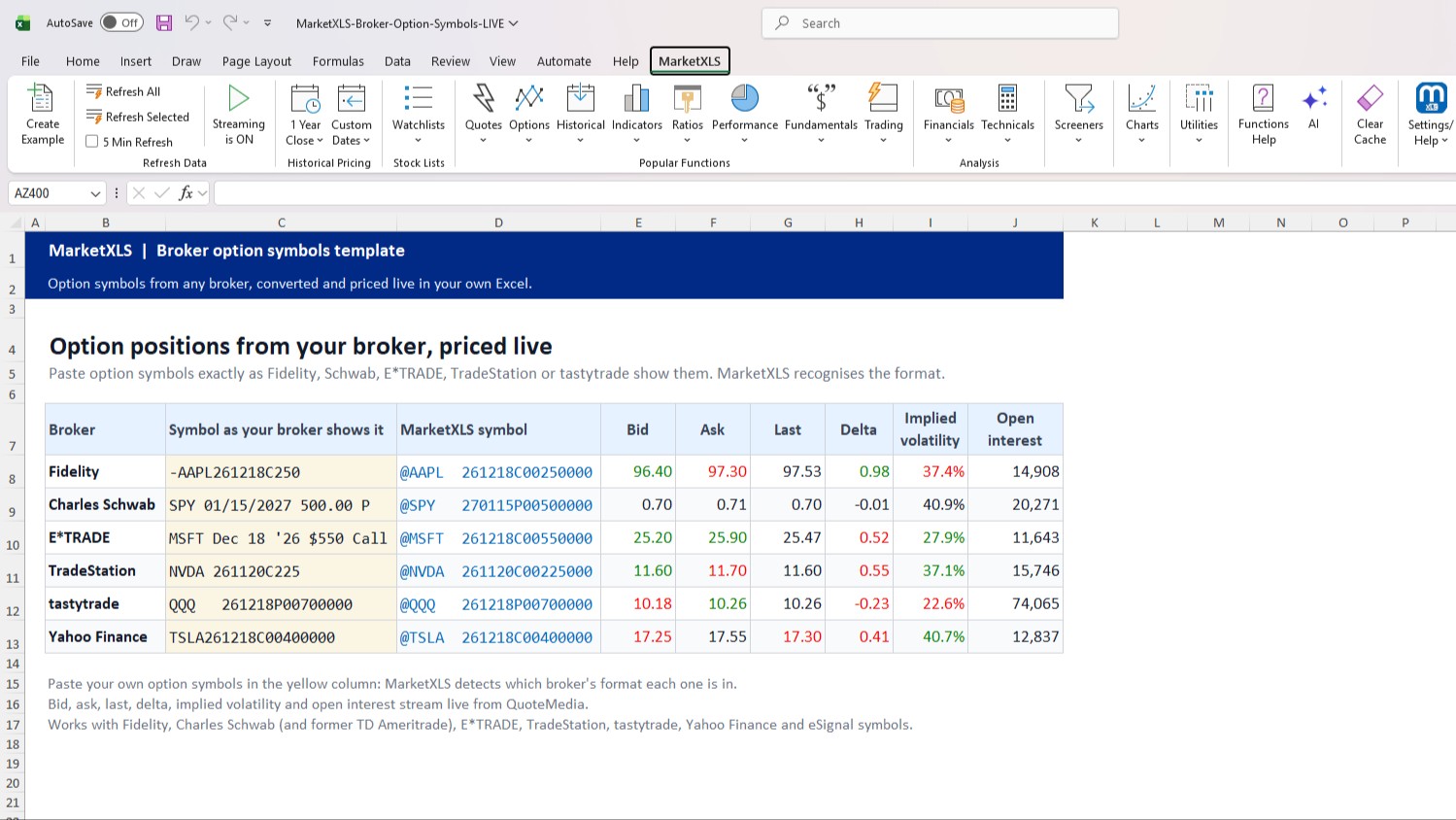
Paste option positions from Fidelity, Schwab, E*TRADE, TradeStation or tastytrade into Excel and get live bid, ask, delta, implied volatility and open interest.
What is in the template
- Your broker positions: paste option symbols exactly as your broker shows them. MarketXLS detects each format, converts it to the MarketXLS symbol and streams the bid, ask, last price, delta, implied volatility and open interest. The sheet starts with one example from each broker.
- One option, every broker: enter the underlying, expiration, call or put, and strike once, and see the symbol in the format Fidelity, Charles Schwab, E*TRADE, TradeStation, tastytrade, Yahoo Finance and eSignal each use.
- How it works: the functions and what you need.
Option symbol formats it reads
- Fidelity:
-AAPL261218C250 - Charles Schwab (and former TD Ameritrade):
SPY 01/15/2027 500.00 P - E*TRADE:
MSFT Dec 18 '26 $550 Call - TradeStation:
NVDA 261120C225 - tastytrade:
QQQ 261218P00700000 - Yahoo Finance:
TSLA261218C00400000
Recognition is strict: a symbol MarketXLS cannot read returns a clear message instead of a guess, so a mistyped position never gets priced as the wrong contract.
MarketXLS functions used
=OptionSymbolConvert(symbol) detects the broker format and returns the MarketXLS symbol. =OptionSymbolConvert(symbol, from, to) converts between any two formats, for example =OptionSymbolConvert(A2, "qm", "fd") for Fidelity. OptionSymbol builds a symbol from its parts, and QM_Stream_Bid, QM_Stream_Ask, QM_Stream_Last, QM_Stream_Delta, QM_Stream_ImpliedVolatility and QM_Stream_OpenInterest stream the prices.
What you need
The MarketXLS add-in for Windows Excel, version 9.6.6 or later: earlier versions cannot read every format shown here or write the Fidelity and tastytrade formats. The live prices use QuoteMedia streaming (Settings > Data Subscriptions > QuoteMedia). The free preview file opens in any Excel: it holds prices captured during a trading session and shows the formula behind every number.
Educational template, not investment advice. Symbols shown are examples.
Template Screenshots
Get Access to 1 Billion Usable Market data points IN YOUR EXCEL SHEETS WITH EASY TO USE EXCEL FUNCTIONS
Get started today
Similar Templates
No similar templates found