
Google Finance formulas use the built-in GOOGLEFINANCE function in Google Sheets: =GOOGLEFINANCE("NASDAQ:AAPL", "price") returns the current price (delayed up to about 20 minutes), and =GOOGLEFINANCE("AAPL", "close", DATE(2025,1,1), DATE(2025,12,31), "DAILY") returns historical closes. It is free and covers prices, volume, market cap, P/E, EPS, 52-week range, and currency rates, but not dividends, technical indicators, or options. This guide lists every working attribute, shows dashboard and portfolio tutorials, explains the common errors, and compares it with MarketXLS, a paid add-on for Google Sheets and Excel.
Try it in your own spreadsheet
Get the free MarketXLS sample workbook (.xlsx).
No account needed. MarketXLS live data requires a paid plan.
Explore more videos
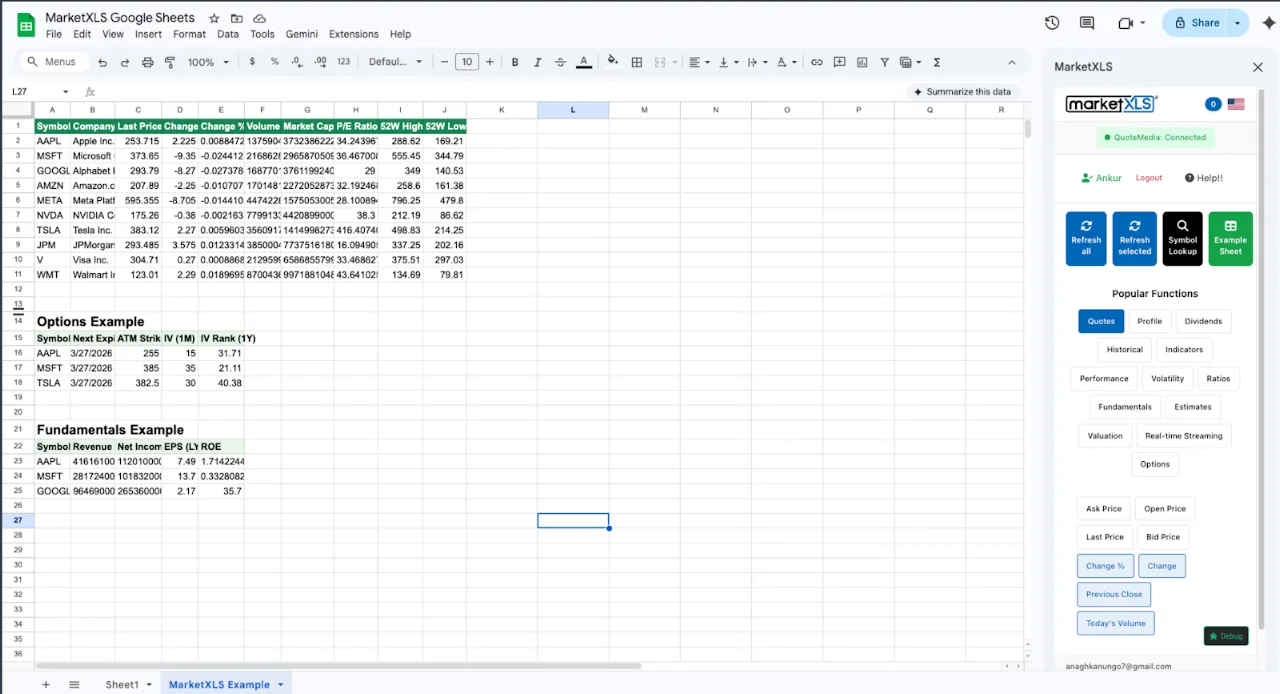
Google Finance Formulas: Understanding the GOOGLEFINANCE Function
Google finance formulas are built around a single function called GOOGLEFINANCE. This function connects your Google Sheets spreadsheet to Google's financial data servers and returns live or historical information for stocks, ETFs, mutual funds, currencies, and select market indices.
Basic Syntax
=GOOGLEFINANCE(ticker, [attribute], [start_date], [end_date], [interval])
Parameters:
- ticker (required) - The stock symbol, optionally prefixed with the exchange. Examples:
"AAPL","NASDAQ:AAPL","NSE:RELIANCE" - attribute (optional) - The data point you want. Defaults to
"price"if omitted - start_date (optional) - Start date for historical queries
- end_date (optional) - End date for historical queries
- interval (optional) -
"DAILY"or"WEEKLY"for historical data frequency
The simplest google finance formula is:
=GOOGLEFINANCE("AAPL")
This returns Apple's current stock price (delayed by approximately 20 minutes).
Google Finance Formulas: Complete Attribute Reference (2026)
Here is every attribute that works with google finance formulas for real-time (non-historical) data:
| Attribute | Description | Example |
|---|---|---|
price | Current price (default) | =GOOGLEFINANCE("AAPL","price") |
priceopen | Today's opening price | =GOOGLEFINANCE("AAPL","priceopen") |
high | Today's high | =GOOGLEFINANCE("AAPL","high") |
low | Today's low | =GOOGLEFINANCE("AAPL","low") |
volume | Today's trading volume | =GOOGLEFINANCE("AAPL","volume") |
marketcap | Market capitalization | =GOOGLEFINANCE("AAPL","marketcap") |
tradetime | Time of last trade | =GOOGLEFINANCE("AAPL","tradetime") |
datadelay | Data delay in minutes | =GOOGLEFINANCE("AAPL","datadelay") |
volumeavg | Average daily volume | =GOOGLEFINANCE("AAPL","volumeavg") |
pe | Price-to-earnings ratio | =GOOGLEFINANCE("AAPL","pe") |
eps | Earnings per share | =GOOGLEFINANCE("AAPL","eps") |
high52 | 52-week high | =GOOGLEFINANCE("AAPL","high52") |
low52 | 52-week low | =GOOGLEFINANCE("AAPL","low52") |
change | Price change since close | =GOOGLEFINANCE("AAPL","change") |
changepct | Percentage change | =GOOGLEFINANCE("AAPL","changepct") |
closeyest | Yesterday's close | =GOOGLEFINANCE("AAPL","closeyest") |
shares | Shares outstanding | =GOOGLEFINANCE("AAPL","shares") |
currency | Trading currency | =GOOGLEFINANCE("AAPL","currency") |
Historical Data Attributes
For historical queries with date ranges, google finance formulas support these attributes:
| Attribute | Description |
|---|---|
open | Opening price |
high | Daily high |
low | Daily low |
close | Closing price |
volume | Daily trading volume |
Example of a historical query:
=GOOGLEFINANCE("AAPL","close",DATE(2025,1,1),DATE(2025,12,31),"DAILY")
This returns a two-column table of dates and closing prices for all trading days in 2025.
Google Finance Formulas: Practical Tutorials
Tutorial 1: Build a Multi-Stock Watchlist
Set up a watchlist that monitors several stocks simultaneously:
- In column A, list ticker symbols: AAPL, MSFT, GOOGL, AMZN, NVDA
- In column B:
=GOOGLEFINANCE(A2,"price")for current price - In column C:
=GOOGLEFINANCE(A2,"changepct")for daily percentage change - In column D:
=GOOGLEFINANCE(A2,"volume")for trading volume - In column E:
=GOOGLEFINANCE(A2,"pe")for P/E ratio - In column F:
=GOOGLEFINANCE(A2,"marketcap")for market cap
Copy each formula down for all tickers. The watchlist updates automatically throughout the trading day.
Tutorial 2: Currency Conversion Calculator
Google finance formulas handle currency pairs using a special format:
=GOOGLEFINANCE("CURRENCY:USDEUR")
=GOOGLEFINANCE("CURRENCY:GBPJPY")
=GOOGLEFINANCE("CURRENCY:USDINR")
Build a converter: put the amount in A1, source currency code in B1, target currency code in C1, then use:
=A1 * GOOGLEFINANCE("CURRENCY:" & B1 & C1)
For historical currency data:
=GOOGLEFINANCE("CURRENCY:USDEUR","price",DATE(2025,1,1),DATE(2025,12,31),"DAILY")
Tutorial 3: Simple Portfolio Tracker
Track your holdings with google finance formulas:
| Column | Content | Formula |
|---|---|---|
| A | Ticker | AAPL |
| B | Shares Owned | 50 |
| C | Cost Basis/Share | 180 |
| D | Current Price | =GOOGLEFINANCE(A2,"price") |
| E | Current Value | =D2*B2 |
| F | Gain/Loss | =(D2-C2)*B2 |
| G | Gain/Loss % | =(D2-C2)/C2 |
Sum columns E and F for total portfolio value and total P&L.
Tutorial 4: Historical Price Chart
Create a price chart in three steps:
- Enter:
=GOOGLEFINANCE("AAPL","close",TODAY()-90,TODAY(),"DAILY") - Select the entire data range that spills
- Go to Insert - Chart and choose Line chart
You now have a 90-day price chart built entirely from google finance formulas.
Tutorial 5: SPARKLINE Mini Charts
Create inline charts in a single cell:
=SPARKLINE(GOOGLEFINANCE("AAPL","close",TODAY()-30,TODAY(),"DAILY"))
This renders a tiny line chart showing the 30-day price trend directly inside the cell - ideal for compact dashboards.
Tutorial 6: Index and ETF Tracking
Google finance formulas work with major indices and ETFs:
=GOOGLEFINANCE("SPY","price")              // S&P 500 ETF
=GOOGLEFINANCE("QQQ","price")              // NASDAQ 100 ETF
=GOOGLEFINANCE("VTI","price")              // Total Stock Market ETF
=GOOGLEFINANCE(".DJI","price")             // Dow Jones Industrial Average
=GOOGLEFINANCE("INDEXNASDAQ:.IXIC","price") // NASDAQ Composite
Note that index ticker formats can be inconsistent. If one format returns an error, try adding the exchange prefix.
Tutorial 7: Cryptocurrency Prices
Google finance formulas support some cryptocurrency pairs:
=GOOGLEFINANCE("BTCUSD")
=GOOGLEFINANCE("ETHUSD")
Coverage is limited and data reliability varies. For comprehensive crypto tracking, dedicated tools are recommended.
Google Finance Formulas: Advanced Techniques
Combining with QUERY for Filtered Data
=QUERY(GOOGLEFINANCE("AAPL","close",DATE(2025,1,1),TODAY(),"DAILY"),"SELECT * WHERE Col2 > 200")
This filters historical data to show only days when Apple traded above $200.
Stripping Headers from Historical Data
GOOGLEFINANCE returns a header row with historical queries. Remove it with INDEX:
=INDEX(GOOGLEFINANCE("AAPL","close",TODAY()-55,TODAY(),"DAILY"),2,2,50,1)
Approximate Moving Average
=AVERAGE(INDEX(GOOGLEFINANCE("AAPL","close",TODAY()-55,TODAY(),"DAILY"),2,2,50,1))
This calculates a rough 50-day moving average, though it requires manual workarounds and is not as reliable as a dedicated function.
IFERROR for Clean Dashboards
Wrap google finance formulas in IFERROR to handle unavailable data gracefully:
=IFERROR(GOOGLEFINANCE("AAPL","price"),"N/A")
International Stock Exchanges
For non-U.S. stocks, use exchange prefixes:
=GOOGLEFINANCE("LON:VOD")         // Vodafone - London
=GOOGLEFINANCE("TYO:7203")        // Toyota - Tokyo
=GOOGLEFINANCE("NSE:RELIANCE")    // Reliance - India
=GOOGLEFINANCE("BIT:ENI")         // ENI - Italy
Google Finance Formulas: Known Limitations
Despite being free and convenient, google finance formulas have significant limitations that every user should understand:
1. Data Is Delayed 20 Minutes
GOOGLEFINANCE data is delayed by approximately 20 minutes for most exchanges. This makes it unsuitable for active trading or any strategy requiring current pricing.
2. Only About 18 Attributes Available
The function supports roughly 18 real-time attributes. There is no access to:
- Dividend yield or dividend per share
- Revenue, net income, or other income statement data
- Balance sheet metrics (debt, assets, book value)
- Technical indicators (RSI, MACD, Bollinger Bands, moving averages)
- Options data (chains, Greeks, implied volatility)
- Streaming real-time data
3. No Intraday Historical Data
The smallest historical interval is daily. You cannot retrieve 1-minute, 5-minute, or hourly bars.
4. Inconsistent Coverage
Some tickers work perfectly while others return #N/A. Coverage varies by exchange, with non-U.S. stocks, OTC securities, and smaller exchanges having spotty data.
5. Rate Limits
Google imposes undocumented rate limits. Sheets with hundreds of GOOGLEFINANCE calls may show #N/A errors or load extremely slowly.
6. No Fundamental Screening
You cannot screen stocks based on fundamentals. There is no way to filter for stocks with P/E under 15 or dividend yield above 3% using only GOOGLEFINANCE.
7. Google Sheets Only
The function does not work in Microsoft Excel. If you need financial data in Excel, you need an alternative solution.
8. No Technical Indicators
Calculating even a simple RSI or accurate moving average requires complex nested formulas with QUERY, INDEX, and AVERAGE that are fragile and hard to maintain.
Google Finance Formulas vs. MarketXLS: Feature Comparison
For investors outgrowing GOOGLEFINANCE, MarketXLS provides over 1,000 financial functions in both Google Sheets and Excel:
| Feature | GOOGLEFINANCE | MarketXLS |
|---|---|---|
| Platform | Google Sheets only | Google Sheets + Excel |
| Cost | Free | Subscription (see pricing) |
| Real-time data | Up to 20-min delay | =LAST(): 15-min delayed on Standard, real-time on Advanced and Business |
| Streaming | No | Yes in Excel via =QM_Stream_Last() |
| Attributes | ~18 | 1,000+ functions |
| Dividend data | Not available | =DIVIDENDYIELD(), =DIVIDENDPERSHARE() |
| Technical indicators | Not available | =RSI(), =SIMPLEMOVINGAVERAGE(), =EXPONENTIALMOVINGAVERAGE() |
| Fundamental data | P/E, EPS only | Revenue, net income, free cash flow, margins, ratios |
| Options data | Not available | Full chains via =QM_GETOPTIONCHAIN() |
| Historical data | Daily/Weekly | Full OHLCV via =QM_GETHISTORY() |
| Portfolio analytics | Not available | Beta, risk metrics, correlation |
| Stock screening | Not available | Built-in screener functions |
MarketXLS Functions That Replace GOOGLEFINANCE
Here is how MarketXLS functions map to common GOOGLEFINANCE use cases:
Real-time pricing:
=LAST("AAPL")              // Last trade price
=BID("AAPL")               // Current bid
=ASK("AAPL")               // Current ask
=QM_Stream_Last("AAPL")   // Streaming price (Excel, Advanced/Business plans)
Formula documentation: LAST, BID, ASK, QM_Stream_Last
Fundamentals (not available in GOOGLEFINANCE):
=PERATIO("AAPL")            // P/E ratio
=DIVIDENDYIELD("AAPL")      // Dividend yield
=DIVIDENDPERSHARE("AAPL")   // Dividend per share
=PROFITMARGIN("AAPL")       // Profit margin
=REVENUEGROWTH("AAPL")      // Revenue growth rate
=PRICETOBOOK("AAPL")        // Price-to-book ratio
=FORWARDPE("AAPL")          // Forward P/E
=PEGRATIO("AAPL")           // PEG ratio
Formula documentation: PERATIO, DIVIDENDYIELD, DIVIDENDPERSHARE, PROFITMARGIN, REVENUEGROWTH, PRICETOBOOK, FORWARDPE, PEGRATIO
Technical indicators (not available in GOOGLEFINANCE):
=RSI("AAPL")                        // 14-day RSI
=SIMPLEMOVINGAVERAGE("AAPL",50)     // 50-day SMA
=EXPONENTIALMOVINGAVERAGE("AAPL",12) // 12-day EMA
Formula documentation: RSI, SIMPLEMOVINGAVERAGE, EXPONENTIALMOVINGAVERAGE
Historical data:
=QM_GETHISTORY("AAPL")                      // Full OHLCV history
=OPEN_HISTORICAL("AAPL","2025-06-01")        // Historical open
=CLOSE_HISTORICAL("AAPL","2025-06-01")       // Historical close
=GETHISTORY("AAPL","2025-01-01","2025-12-31","D") // Custom range
Formula documentation: QM_GETHISTORY, OPEN_HISTORICAL, CLOSE_HISTORICAL, GETHISTORY
Options (not available in GOOGLEFINANCE):
=QM_GETOPTIONCHAIN("^SPX")                  // Full option chain
=OPTIONSYMBOL("AAPL","2026-06-19","C",200)   // Build option symbol
=QM_GETOPTIONQUOTESANDGREEKS("^SPX")         // Options with Greeks
Formula documentation: QM_GETOPTIONCHAIN, OPTIONSYMBOL, QM_GETOPTIONQUOTESANDGREEKS
Income statement and balance sheet (not available in GOOGLEFINANCE):
=HF_REVENUE("AAPL",2025)            // Annual revenue
=HF_NET_INCOME("AAPL",2025)         // Net income
=HF_FREE_CASH_FLOW("AAPL",2025)     // Free cash flow
=HF_TOTAL_ASSETS("AAPL",2025)       // Total assets
=REVENUE("AAPL")                     // Latest revenue
=TOTALDEBT("AAPL")                   // Total debt
=TOTALCASH("AAPL")                   // Cash on hand
Formula documentation: HF_REVENUE, HF_NET_INCOME, HF_FREE_CASH_FLOW, HF_TOTAL_ASSETS, REVENUE, TOTALDEBT, TOTALCASH
Google Finance Formulas: When to Stay vs. When to Upgrade
Stay with GOOGLEFINANCE if:
- You are a beginner investor learning the basics
- You only need simple price tracking for a handful of stocks
- Budget is a primary concern and you need zero-cost data
- You work exclusively in Google Sheets
- Your analysis is limited to prices, volume, and basic P/E ratios
Upgrade to MarketXLS if:
- You need real-time or streaming stock prices
- You analyze dividends, fundamentals, or technical indicators
- You trade options and need chains, Greeks, and implied volatility
- You work in both Excel and Google Sheets
- You need to screen stocks based on financial metrics
- You build portfolio models with risk analytics
- You need historical data beyond basic daily OHLCV
- You want 1,000+ functions instead of 18 attributes
Explore MarketXLS plans | Install for Google Sheets
Google Finance Formulas: Troubleshooting Common Errors
#N/A Error
Causes: Invalid ticker, unsupported exchange, rate limit reached, or data simply unavailable for that attribute/ticker combination.
Fixes: Double-check the ticker format. Try adding the exchange prefix (e.g., "NASDAQ:AAPL"). Reduce the total number of GOOGLEFINANCE calls in your sheet. Wait and retry - rate limits are temporary.
#REF! Error
Cause: Historical data array is blocked by existing cell content below or to the right.
Fix: Clear enough empty rows and columns for the historical data to spill.
#VALUE! Error
Cause: Incorrect date format or misspelled attribute name.
Fix: Use DATE() function for dates instead of text strings. Verify the attribute name matches the documented list exactly.
Slow Loading or Stuck Loading
Cause: Too many GOOGLEFINANCE formulas in one spreadsheet.
Fix: Split data across multiple sheets or tabs. Consider caching values by copying and pasting as values periodically. Reduce the number of unique tickers being queried.
Data Shows as 0 or Blank
Cause: Market is closed or the attribute is not supported for that instrument type (e.g., pe for ETFs).
Fix: Check if the attribute applies to the instrument. ETFs and indices do not have P/E ratios through GOOGLEFINANCE.
Google Finance Formulas: The Options Gap
Of every limitation listed above, the options gap is the hardest one to work around. GOOGLEFINANCE has no option chain attribute, no strike data, no expiration data, no Greeks, and no implied volatility. There is no formula combination, no QUERY trick, and no IMPORTHTML workaround that produces a reliable option chain in Google Sheets. Options are simply not in the data set.
Option Chains
MarketXLS exposes the chain as spilled arrays, filtered by moneyness, expiry class, or activity:
=QM_GetOptionChainActive("AAPL")            Active contracts only
=QM_GetOptionChainAtTheMoney("AAPL")        Strikes nearest the spot price
=QM_GetOptionChainInTheMoney("AAPL")        ITM contracts
=QM_GetOptionChainOutOfTheMoney("AAPL")     OTM contracts
=QM_GetOptionChainNearTerm("AAPL")          Nearest expirations
=QM_GetOptionChainWeeklies("AAPL")          Weekly expirations
=QM_GetOptionChainMonthlies("AAPL")         Monthly expirations
=QM_GetOptionChainQuarterlies("AAPL")       Quarterly expirations
=QM_GetOptionChainStructured("AAPL")        Structured layout for dashboards
=IsOptionable("AAPL")                       Does the ticker have listed options
Formula documentation: QM_GetOptionChainActive, QM_GetOptionChainAtTheMoney, QM_GetOptionChainInTheMoney, QM_GetOptionChainOutOfTheMoney, QM_GetOptionChainNearTerm, QM_GetOptionChainWeeklies, QM_GetOptionChainMonthlies, QM_GetOptionChainQuarterlies, QM_GetOptionChainStructured, IsOptionable
Single Contract Quotes
Build the OCC contract symbol once, then quote it like any other instrument:
=OptionSymbol("AAPL", "2026-06-19", "C", 200)
=QM_Last(contract)     =QM_Bid(contract)     =QM_Ask(contract)
Formula documentation: OptionSymbol, QM_Last, QM_Bid, QM_Ask
Greeks
Both on-demand and streaming Greeks are available per contract:
=OPT_Delta(contract)     =Stream_Delta(contract)
=OPT_Gamma(contract)     =Stream_Gamma(contract)
=OPT_Theta(contract)     =Stream_Theta(contract)
=OPT_Vega(contract)      =Stream_Vega(contract)
=QM_GetOptionQuotesAndGreeks("AAPL")   Chain plus Greeks in one spill
Formula documentation: OPT_Delta, Stream_Delta, OPT_Gamma, Stream_Gamma, OPT_Theta, Stream_Theta, OPT_Vega, Stream_Vega, QM_GetOptionQuotesAndGreeks
Implied Volatility and IV Rank
Implied volatility is the piece most tutorials skip. A 40% IV means nothing on its own - what matters is where that number sits inside its own one-year range, which is what IV rank measures:
=ImpliedVolatility("AAPL")           Current IV
=ImpliedVolatility30D("AAPL")        30-day IV
=ImpliedVolatility90D("AAPL")        90-day IV
=ImpliedVolatility1Y("AAPL")         1-year IV
=ImpliedVolatilityRank1Y("AAPL")     IV rank over one year
=IVRank1Year("AAPL")                 IV rank, alternate form
Formula documentation: ImpliedVolatility, ImpliedVolatility30D, ImpliedVolatility90D, ImpliedVolatility1Y, ImpliedVolatilityRank1Y, IVRank1Year
A high IV rank favors premium selling. A low IV rank favors premium buying. Neither conclusion is reachable from a raw IV number alone.
Theoretical Value and Historical Chains
=BlackScholesOptionValue(...)           Theoretical price vs market price
=OPT_HistoricalOptionChain("AAPL", date)  Chain as it stood on a past date
=Beta("AAPL")                            Underlying risk reference
Formula documentation: BlackScholesOptionValue, OPT_HistoricalOptionChain, Beta
=OPT_HistoricalOptionChain() is what makes backtesting an options strategy possible in a spreadsheet, because it returns the chain as it actually was, not as it is now.
Volume and Activity Scans
=OPT_OptionsVolumeLeaders()             Highest option volume
=OPT_OptionsOIleaders()                 Highest open interest
=OPT_OptionsChangeInVolumeLeaders()     Largest volume changes
=OPT_UnusualOptionVolScanEOD()          End-of-day unusual volume scan
=OPT_TotalVolumeOptions("AAPL")         Total option volume for a ticker
=OPT_TotalOpenInterestOptions("AAPL")   Total open interest for a ticker
Formula documentation: OPT_OptionsVolumeLeaders, OPT_OptionsOIleaders, OPT_OptionsChangeInVolumeLeaders, OPT_UnusualOptionVolScanEOD, OPT_TotalVolumeOptions, OPT_TotalOpenInterestOptions
One important platform note: the streaming Greeks and streaming quote functions require Excel on the desktop. Google Sheets can run the on-demand MarketXLS functions, but a continuously updating stream needs the desktop add-in.
Google Finance Formulas: Download Excel Templates
We have created comparison templates to help you evaluate google finance formulas against MarketXLS:
- - Side-by-side comparison with sample data
- - Contains live MarketXLS formulas (requires MarketXLS add-in)
Each workbook includes six sheets: How To Use, Main Dashboard, Scenario Analysis, Strategy, Portfolio Comparison, and Correlation Matrix.
For the options workflow described above, two dedicated workbooks cover the option chain, Greeks, and implied volatility layout:
- - live option chain and Greeks formulas
- - values pre-filled for reading without the add-in
Google Finance Formulas: Frequently Asked Questions
What are google finance formulas and how do they work?
Google finance formulas refer to the GOOGLEFINANCE function built into Google Sheets. This function pulls real-time and historical financial data from Google's servers directly into your spreadsheet cells. The basic syntax is =GOOGLEFINANCE("TICKER","attribute"). For example, =GOOGLEFINANCE("AAPL","price") returns Apple's current stock price with approximately 20 minutes of delay. The function supports about 18 different attributes for real-time data and 5 attributes for historical date-range queries.
Can I use google finance formulas in Microsoft Excel?
No. The GOOGLEFINANCE function is exclusive to Google Sheets and does not exist in Microsoft Excel. For Excel users who need financial data in their spreadsheets, MarketXLS provides over 1,000 financial functions including =LAST("AAPL") for current prices, =DIVIDENDYIELD("AAPL") for dividend data, and =RSI("AAPL") for technical indicators. MarketXLS also works as a Google Sheets add-on, so you can use the same functions on both platforms.
Why does GOOGLEFINANCE return #N/A for some stocks?
The most common causes are invalid or unsupported ticker symbols, misspelled attributes, rate limiting from too many formulas in one sheet, or the data simply not being available for that particular instrument or exchange. Try using the exchange prefix format (e.g., "NASDAQ:AAPL" or "LON:VOD") and verify the attribute is valid for the instrument type. ETFs and indices do not support all attributes.
Does GOOGLEFINANCE provide dividend data?
No. GOOGLEFINANCE does not have attributes for dividend yield, dividend per share, or dividend history. This is one of its most significant limitations for income-focused investors. MarketXLS fills this gap with =DIVIDENDYIELD("AAPL"), =DIVIDENDPERSHARE("AAPL"), =PAYOUTRATIO("AAPL"), and =DIVIDENDDATE("AAPL") - all available in both Google Sheets and Excel.
How often does GOOGLEFINANCE data refresh?
GOOGLEFINANCE data refreshes approximately every 20 minutes during market hours. You cannot force a manual refresh. The datadelay attribute (=GOOGLEFINANCE("AAPL","datadelay")) tells you the current delay. For real-time data, MarketXLS provides =LAST("AAPL") for current prices (real-time on the Advanced and Business plans) and, in Excel, =QM_Stream_Last("AAPL") for continuously updating streaming prices.
Can I use google finance formulas for options trading?
No. GOOGLEFINANCE has zero options support - no option chains, no strike prices, no Greeks, no implied volatility. Options traders need a dedicated tool like MarketXLS, which provides =QM_GETOPTIONCHAIN("^SPX") for full option chains and =QM_GETOPTIONQUOTESANDGREEKS("^SPX") for Greeks and IV data directly in Google Sheets or Excel.
Google Finance Formulas: Summary
Google finance formulas provide a free, accessible entry point for pulling financial data into Google Sheets. The GOOGLEFINANCE function supports real-time stock prices, historical data, currency exchange rates, and basic fundamentals like P/E ratio and EPS. For beginners and casual investors, it is an excellent starting tool that requires zero setup.
However, the limitations are real: 20-minute data delays, no dividend data, no technical indicators, no options support, inconsistent coverage, only about 18 attributes, and Google Sheets exclusivity. When your analysis needs grow beyond these constraints, MarketXLS provides the professional upgrade with over 1,000 financial functions, real-time data, full fundamental coverage, technical indicators, options analytics, and compatibility with both Google Sheets and Microsoft Excel.
Whether you start with google finance formulas or jump straight to MarketXLS, the key is choosing the right tool for your analysis needs. For pricing and plan details, visit MarketXLS.